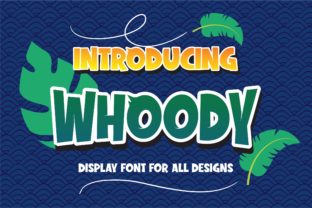
Whoody: Where Playful Typography Meets Real-World Impact
Typography isn’t just about legibility—it’s about tone, trust, and texture. In a digital landscape saturated with minimalist sans-serifs and over-polished variable fonts, Whoody arrives not as another option, but as a recalibration: a fun and bold font with an incredibly whimsical feel. Fall in love with its playful vibe—not as a novelty, but as a deliberate, human-centered design choice that resonates across screens, brands, and stories.
What Makes Whoody More Than Just “Cute”
At first glance, Whoody’s exaggerated curves, bouncing baseline, and cheerful irregularity suggest lightheartedness—and it is. But look closer: its letterforms are carefully balanced for rhythm and readability at medium sizes (16–24px), its x-height is generous without sacrificing personality, and its spacing avoids the visual clutter that often plagues expressive display fonts. It’s designed to be used—not just admired.
Unlike many decorative typefaces that fade into background noise or overwhelm body text, Whoody thrives in context where voice matters most: headlines for independent newsletters, CTA buttons in creator-led SaaS dashboards, packaging for small-batch food brands, or slide titles in educator-led workshops. Its strength lies in intentionality—not irony.
Why Whimsy Is Showing Up in Serious Places
Over the past five years, we’ve seen a quiet shift in professional communication: from sterile uniformity toward warmth with precision. Think of the rise of illustrated brand systems (like Notion’s updated UI), hand-drawn icons in fintech apps, or the resurgence of tactile textures in e-commerce product photography. These aren’t throwbacks—they’re responses to fatigue. Users—especially adults aged 20–50—are spending more time online, juggling multiple platforms, tools, and notifications. A little visual joy, when grounded in clarity, doesn’t distract; it disarms.
Whoody fits neatly into this evolution—not by rejecting professionalism, but by redefining what professionalism can include. A freelance illustrator using Whoody for their portfolio headline signals approachability *and* craft. A wellness coach choosing it for their email subject line conveys empathy before the first word is read. A local bookstore applying it to event posters invites curiosity, not confusion.
How Workflows Are Making Room for Expressive Type
Modern tools have lowered the barrier to thoughtful typography. Variable font support in Figma, improved web font loading strategies (like font-display: swap), and CSS features like @font-face descriptors mean designers no longer need to choose between performance and personality. You can now serve Whoody as a lightweight WOFF2 file, load it conditionally, and pair it with a neutral, highly readable body font—no technical compromise required.
More importantly, collaborative workflows now treat type as part of brand voice—not just visual polish. Marketing teams share typographic guidelines alongside tone-of-voice docs. Educators embed font choices into lesson-plan templates. Even non-designers use Canva’s font pairing suggestions or Webflow’s typography presets to make intentional choices. Whoody works because it’s built for these realities: flexible enough for rapid iteration, distinctive enough to hold meaning.
Real Use Cases—Not Just Mockups
- A small business owner uses Whoody for Instagram Story stickers promoting weekend pop-ups—its bounce adds energy without requiring animation.
- An edtech freelancer applies it sparingly in slide decks for teacher training—just on section headers—to signal transition points and reduce cognitive load during long sessions.
- A newsletter writer sets their “Quick Tip” subheadings in Whoody (size 20px, line-height 1.3) against a clean serif body font—creating visual hierarchy that feels personal, not promotional.
- A product team tests two versions of a feature announcement: one with a standard sans-serif headline, one with Whoody. Qualitative feedback shows users associate the latter with “friendly guidance,” not “corporate update.”
Pairing Whoody Without Overloading the Page
The biggest risk with expressive fonts isn’t ugliness—it’s inconsistency. Whoody shines brightest when contrast does the heavy lifting. Pair it with a humanist sans-serif (like Inter, Poppins, or even system fonts like -apple-system) for body copy. Avoid other high-contrast or script fonts nearby—let Whoody be the sole voice of levity in the composition.
In practice, that means:
- Use it at 24–36px for hero headlines, never smaller than 18px in UI contexts.
- Limit usage to one prominent element per screen or layout—never more than two weights (e.g., Regular + Bold).
- Ensure sufficient color contrast against backgrounds (minimum 4.5:1 for accessibility compliance).
- Test rendering across devices—Whoody’s curves hold up well on modern browsers, but avoid ultra-thin weights on low-DPI screens.
Whoody in Context: Beyond Aesthetics
Typography choices quietly shape perception—and perception shapes behavior. When a financial literacy blog uses Whoody for its “Myth vs. Fact” section headers, readers report feeling less intimidated by complex topics. When a therapy practice selects it for workshop flyers, new clients mention “feeling welcomed before walking in.” These aren’t anecdotes; they reflect how type contributes to psychological safety—a growing priority in service design, education, and health communication.
This isn’t about making everything “fun.” It’s about aligning form with function and audience. Whoody wouldn’t suit a legal document or a clinical trial interface—and it shouldn’t. Its relevance lies in spaces where humanity, clarity, and connection are primary goals: creative portfolios, community-driven platforms, learning resources, indie products, and mission-aligned brands.
Looking Ahead—Without the Hype
Will Whoody become the default for every startup logo? No—and it shouldn’t. But its growing adoption reflects something deeper: a maturing understanding that digital experiences succeed not through frictionless efficiency alone, but through moments of resonance. As AI-generated content floods feeds and interfaces grow more automated, the value of intentional, human-made details rises—not as decoration, but as differentiation.
That’s why designers, marketers, educators, and founders are paying attention. Not because Whoody solves a technical problem, but because it helps solve a human one: how to communicate with warmth, without sacrificing credibility; with playfulness, without losing focus.
If you’ve hesitated to try expressive type—worried it might feel unprofessional or hard to justify—start small. Swap your next email subject line. Redesign one landing page section. Test it in a prototype with real users. Notice how people respond—not just to the words, but to the shape of them. That’s where Whoody earns its place: not as a trend, but as a tool for clearer, kinder, more memorable communication.