Beach Shop
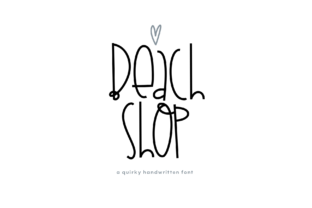
Beach Shop isn’t just another handwritten font—it’s a cheerful, slightly imperfect, sun-drenched personality in type form. With its uneven baseline, playful swashes, and gentle bounce, it captures the relaxed energy of coastal creativity without tipping into childishness or cliché. Designers, small business owners, educators, and hobbyists alike reach for Beach Shop when they want warmth, approachability, and visual distinction—especially for packaging, social graphics, invitations, merch, and brand storytelling that feels human, not algorithmic.
Why It’s Easy to Misjudge Beach Shop at First Glance
Because Beach Shop looks so friendly and effortless, many assume it’s “plug-and-play”—ready for any context without testing. That assumption leads to three common missteps: using it where legibility suffers, overlooking licensing limits, and skipping compatibility checks before committing to a project.
1. Assuming It Works Everywhere—Especially at Small Sizes or on Screens
Beach Shop thrives at medium to large sizes (36pt and up) with generous spacing. But shrink it to 14pt for a website menu or mobile app label, and the delicate joins, subtle flourishes, and variable stroke weight blur together. Readers don’t pause to admire charm—they scan. If your audience can’t instantly recognize “Summer Sale” or “Hand-Poured Soy Candle” in Beach Shop at body-text scale, clarity loses to cuteness.
Better approach: Reserve Beach Shop for headlines, logos, product tags, or short callouts—never long paragraphs, data tables, or interface labels. Pair it intentionally: use a clean, neutral sans-serif (like Inter, Lato, or Open Sans) for supporting text. Test printouts and device previews—not just desktop mockups—before finalizing.
2. Overlooking What “Personal Use Only” Really Means
Some free versions of Beach Shop are labeled “personal use only,” but creators often miss the fine print. Selling a t-shirt with Beach Shop on it? That’s commercial use—even if you designed it yourself. Using it in a client’s Instagram post? Also commercial. Licensing isn’t about intent; it’s about distribution and revenue. Ignoring this risks takedowns, legal notices, or damaged trust with clients and platforms.
Better approach: Always verify the license *before* designing anything meant for public or paid use. Reputable sources (like Creative Market, Font Squirrel, or the designer’s official site) clearly state usage rights. When in doubt, buy the full commercial license—it’s typically under $30 and covers unlimited projects for one user. Think of it as insurance for your time, reputation, and peace of mind.
3. Skipping the Glyph & Language Check
Beach Shop is English-optimized. It includes standard Latin characters, basic punctuation, and common accented letters (à, é, ñ), but stops there. If your project serves Spanish-speaking audiences regularly—or includes words like “café,” “naïve,” or “résumé”—you’ll need to confirm whether the version you’re using supports those diacritics. Missing glyphs show up as blank boxes or fallback fonts, breaking visual consistency and professionalism.
Better approach: Before downloading or purchasing, open the font’s specimen PDF or live preview tool and search for characters you actually need—not just the alphabet. Type out real phrases from your project (“¡Hola!”, “Ångström”, “München”) and check rendering. If critical characters are missing, consider pairing Beach Shop with a compatible supporting font for multilingual sections—or look for an extended version.
What to Test Before You Commit
Don’t rely on screenshots or single-word samples. Real-world use reveals what specs hide. Here’s what to run through *before* building a full layout:
- Weight contrast: Does Beach Shop have bold or italic variants? (Spoiler: most free versions don’t.) If you need emphasis, you’ll need to simulate boldness—but manual outlining or layering can distort its organic rhythm. Better to plan hierarchy with size, color, or spacing instead.
- Spacing behavior: Try typing “WAVES”, “III”, and “ffl”. Watch how letters interact—especially tall ascenders (b, d, h) next to round descenders (g, y, p). Tight kerning may require manual adjustment in design tools like Illustrator or Figma.
- Export reliability: Some apps render Beach Shop differently when exporting to PDF or web formats. Test SVG export if you’re using it for digital signage or email headers—and verify it renders correctly in Gmail, Outlook, and Apple Mail.
When Beach Shop Shines—And When to Step Back
It excels in contexts where authenticity and mood matter more than neutrality: a boutique’s seasonal newsletter, handmade soap labels, a teacher’s classroom welcome banner, or a wedding invitation suite. Its quirks become strengths—inviting, memorable, and quietly confident.
But it’s not ideal for accessibility-critical materials (like medical instructions or government forms), high-density infographics, or branding systems requiring strict scalability across languages and devices. In those cases, lean on versatile workhorses—then bring in Beach Shop selectively for moments of warmth and character.
A Final Note on Matching Intention to Tool
Fonts aren’t neutral. Beach Shop carries tone—just like a hand-painted sign does versus a laser-cut acrylic plaque. Choosing it says something about your values: approachability over austerity, craft over automation, joy over uniformity. That’s powerful—when intentional.
So ask yourself: Is this the voice I want to speak *with*, not just *over* my content? If yes, test thoughtfully, license honestly, and pair wisely. If not, no shame in saving Beach Shop for next season’s beach-themed workshop handout—and reaching for something quieter today.