Other Side
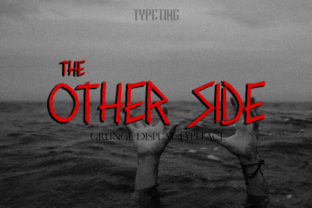
Other Side is a dark and twisted display font with a bold touch—designed not for body text or interface labels, but for moments when visual impact must precede comprehension. It’s the kind of typeface that doesn’t ask permission to command attention. When used intentionally, it transforms headlines, posters, album art, social banners, and short-form marketing assets into unmistakable statements. Its value lies not in versatility, but in precision: it solves one problem exceptionally well—making something feel urgent, layered, or defiantly memorable.
Where Other Side Fits in Your Creative Process
Most fonts serve functional roles: readability, hierarchy, brand continuity. Other Side serves a different function—it’s a deliberate punctuation mark in your workflow. Think of it as the visual equivalent of a well-placed pause before a key sentence, or the shift in lighting before a scene pivots. You don’t use it to set paragraphs or label navigation menus. You reach for it when you’ve already defined your message, audience, and medium—and now need the typography to reinforce tone, not obscure it.
This means Other Side typically enters *after* strategy and early ideation. Before selecting it, you’ve likely clarified your core message, chosen your platform (Instagram carousel? concert poster? limited-edition book cover?), and determined whether “dark and twisted” aligns with both intent and context. That preparation isn’t optional—it’s what prevents misuse. A font like Other Side amplifies intention; it doesn’t substitute for it.
Using Other Side Before, During, and After Execution
Before execution: Test contrast and legibility at intended sizes. Other Side works best at 36pt and above in print, and 48px+ on screen—especially over textured or dark backgrounds. Load it into your design tool early enough to assess spacing, kerning pairs, and how it interacts with supporting typefaces (e.g., a clean sans-serif for body copy). Don’t assume it will pair intuitively—some combinations create unintended tension or visual noise.
During execution: Use it sparingly and structurally. One headline per layout. One dominant word per poster. Avoid stacking multiple words in Other Side unless each letterform contributes meaningfully to the composition. Its weight and irregularity demand breathing room. If you’re designing for digital, test rendering across browsers—some older versions of Safari or Firefox may substitute fallbacks if OpenType features aren’t fully supported. Embedding via @font-face with WOFF2 ensures reliability.
After execution: Audit for consistency—not just within one asset, but across related materials. If Other Side appears on a campaign banner, does its usage echo in the email subject line preview (where it won’t render)? Not necessarily—but the *tone* should. That’s where integration deepens: Other Side becomes part of a broader stylistic contract, not an isolated visual flourish.
Integration With Tools, Platforms, and Teams
Other Side works cleanly in Figma, Adobe Illustrator, and Affinity Designer—especially when leveraging OpenType features like stylistic alternates or ligatures. In Figma, install it as a local font and enable “Use system fonts first” only if you’re sharing files with collaborators who also have it installed. For web use, host it via your own server or a trusted CDN, and always declare fallbacks (e.g., font-family: "Other Side", "Bebas Neue", Impact, sans-serif;). Never rely solely on Google Fonts or third-party hosts unless confirmed compatible.
If you’re part of a team—whether in marketing, publishing, or product—document usage clearly. Create a micro-style guide: approved sizes, color contrast ratios (aim for at least 4.5:1 against background), and prohibited contexts (e.g., “Do not use for accessibility labels or form fields”). This isn’t bureaucracy—it’s efficiency. It prevents last-minute revisions when a developer discovers the font breaks on mobile Chrome, or a writer unknowingly applies it to a 12px caption.
Practical Workflow Examples
- Small business launch: A boutique record label uses Other Side for vinyl sleeve titles and Instagram story highlights—paired with Inter for track listings and bios. The font signals genre (industrial, goth, experimental) before a single note plays.
- Educator creating workshop materials: A university lecturer uses Other Side only on slide section headers (“Unlearning Bias”, “The Data Trap”)—not for bullet points or citations. It cues mental shifts without competing with dense content.
- Freelance designer building a brand identity: They reserve Other Side for the client’s manifesto document and keynote slides—not the logo, website navigation, or business cards. It becomes the voice of the brand’s stance, not its structure.
Compatibility and Long-Term Usability
Other Side is built for display, not endurance. Don’t use it where clarity must persist across devices, lighting conditions, or user abilities. It’s not WCAG-compliant for body text—and shouldn’t be expected to be. Respect its constraints: it thrives in controlled environments (curated websites, printed ephemera, motion graphics with timed reveals) and falters in unpredictable ones (user-generated content feeds, dynamic email clients, multilingual interfaces).
For long-term projects, consider licensing. Free versions often lack full character sets or commercial permissions. If you’re using Other Side in client work, verify the license covers redistribution—or purchase the professional version outright. Skipping this step risks takedowns, rework, or legal exposure down the line. It’s a small upfront cost that protects timeline integrity.
Quality Control and Consistency Checks
Before finalizing any asset with Other Side, run three quick checks:
- Legibility test: Step back three feet (or zoom out to 50%). Can you read the word instantly—even if it’s stylized? If not, reduce complexity or increase size.
- Contrast check: Use a tool like WebAIM’s Contrast Checker. If it fails AA at its intended size and background, adjust background darkness or add a subtle stroke or shadow—not more distortion.
- Context scan: View the piece alongside other brand assets. Does Other Side feel like a natural extension of voice—not a stylistic outlier? If it clashes tonally with photography, iconography, or writing style, revisit alignment before export.
Realistic Expectations for Integration
Other Side won’t streamline your workflow—but it can sharpen your decisions within it. It doesn’t replace research, copywriting, or user testing. What it does is compress tone into form. When a startup founder chooses Other Side for their pitch deck title slide, they’re not just picking a font. They’re signaling confidence in their narrative’s gravity—and trusting the audience to meet that energy.
That trust only holds if the rest of the process supports it. So integrate Other Side where it reinforces, not distracts. Use it after you’ve answered the harder questions: Who needs to hear this? Why does it matter *now*? What action should follow? Then—and only then—let Other Side deliver the first, unforgettable impression.
Final Implementation Note
Start small. Pick one recurring use case—a newsletter header, a series of workshop posters, a product launch countdown graphic—and apply Other Side there consistently for 30 days. Track how it affects engagement, feedback, or internal alignment. Refine based on real usage, not assumptions. Type isn’t neutral. Neither is Other Side. Let it earn its place—not by default, but by design.