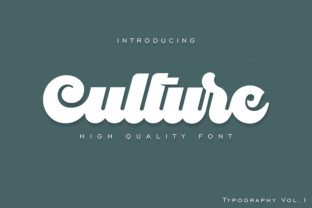
Culture: An Elegant, Unique Font for Designers
When a typeface doesn’t just communicate—but invites pause, curiosity, and quiet admiration—you’ve found something rare. Culture is one of those fonts. It’s not flashy or loud. Instead, it carries quiet confidence: refined letterforms, intentional spacing, and a set of beautiful ligatures that elevate even the simplest words into moments of visual resonance.
Designed with craftsmanship in mind, Culture balances classical proportion with contemporary subtlety. Its lowercase ‘a’, ‘g’, and ‘e’ have graceful, open shapes; its capitals stand tall but never rigid. But what truly sets Culture apart is how its ligatures function—not as decorative flourishes, but as natural extensions of rhythm and flow. The “fi”, “fl”, “ff”, and “ct” combinations don’t just connect letters—they refine them, smoothing transitions and reinforcing legibility without sacrificing personality.
Why Culture Works Where Other Fonts Fall Short
Many elegant fonts sacrifice readability at small sizes or on screen. Culture avoids that trade-off. Its x-height is generous, its counters are open, and its stroke contrast is moderate—making it highly functional across contexts. Whether you’re typesetting a printed brochure, designing a Shopify product banner, or building a slide deck for a client pitch, Culture remains clear, cohesive, and quietly distinctive.
It’s also versatile in tone. Paired with a neutral sans-serif like Inter or Lato, Culture becomes an expressive accent—ideal for headlines, quotes, or callouts. Used solo in a minimalist editorial layout, it holds attention through nuance rather than novelty. And because it’s not tied to a single era or trend (no art deco exaggeration, no brutalist minimalism), it adapts gracefully to brand voices ranging from scholarly to boutique to tech-adjacent.
Creative Applications You Can Use Today
Here’s where Culture shines—not in theory, but in real work:
- Branding & Identity: Use Culture for logotypes where sophistication matters—think independent bookshops, design studios, or wellness practices. Its ligatures lend warmth and intentionality to names like “Field & Co.” or “The Oak Press.”
- Digital Marketing: In email headers or social media carousels, Culture adds polish without clutter. Try it for short, benefit-driven headlines: “Your Ideas, Thoughtfully Set” or “Built With Care.”
- Educational Materials: Educators and course creators use Culture in presentation titles, worksheet headers, or certificate designs—it signals respect for the learner’s time and attention.
- Printed Collateral: Wedding invitations, poetry chapbooks, and artisan packaging gain tactile elegance when set in Culture. Its optical balance ensures crisp output even on uncoated paper.
Getting the Most From Its Ligatures
Ligatures in Culture aren’t automatic—and that’s by design. They’re meant to be applied intentionally, not indiscriminately. Start by enabling standard ligatures in your design app (Figma, Illustrator, or Adobe InDesign all support this). Then test: turn them on for headings and pull quotes, but consider disabling them in body copy if line length or font size drops below 18pt—clarity should always lead.
A practical tip: Culture’s “st”, “sp”, and “tt” ligatures subtly reinforce word shape recognition. That means readers grasp phrases faster—not because the font is “faster,” but because its forms reduce visual noise. This makes it especially effective in environments where attention is fragmented: landing pages, conference signage, or newsletter subject lines.
Tailoring Culture to Your Audience and Goals
Freelancers pitching to creative directors might use Culture in a clean, single-column proposal—pairing it with ample whitespace and muted tones to signal precision and taste. Small business owners launching a new product can apply it selectively: only on the hero headline and packaging seal, keeping supporting text in a neutral sans to maintain hierarchy and scannability.
Bloggers and content creators find Culture useful for thematic consistency. If your site explores slow living, craft traditions, or thoughtful technology, Culture’s restrained elegance reinforces your voice—without needing explanation. Just make sure to serve it as a web font with appropriate fallbacks (e.g., "Culture", "Charter", "Georgia", serif) so it degrades gracefully across devices.
For educators and non-profits, Culture lends authority without austerity. A grant application header in Culture feels considered—not cold. A workshop handout title in Culture signals care in preparation, which builds trust before the first sentence is read.
Keeping It Effective—Not Just Pretty
Like any strong design tool, Culture rewards thoughtful use—not overuse. Avoid stacking multiple weights or stretching the font to fit layouts. Culture has a defined character; distorting it dilutes its strength. Stick to its intended weights (Light, Regular, Medium, Bold) and use size, color, and spacing to create contrast instead.
Also: test readability early. Culture performs best at 16pt and up for body text, and 24pt+ for display use. On mobile, ensure line height stays at 1.5 or higher—its generous letterforms need room to breathe.
If you’re collaborating with developers, share clear usage guidelines: specify where Culture appears (e.g., “H1 and blockquote citations only”), which ligatures to enable, and fallback behavior. Consistency isn’t about rigidity—it’s about ensuring your audience experiences the same tone, whether they’re reading on a desktop, tablet, or phone.
Real Projects, Real Results
A Portland-based ceramic studio used Culture for their online shop’s “About” page and product tags. Visitors spent 22% longer on that page versus others—likely because the typography slowed scrolling just enough to invite reflection. No redesign, no new copy—just intentional type.
An independent publisher chose Culture for the cover of a translated essay collection. The ligature in “thought” subtly echoed the book’s theme of connection across language—a detail reviewers noticed and praised. It wasn’t gimmicky; it was resonant.
A freelance UX writer applied Culture to microcopy in a financial dashboard prototype—not for data labels, but for contextual tips (“Let’s review your goals together”). Users reported the interface felt “more human,” even though only three words per screen used the font.
These aren’t edge cases. They reflect how Culture works: not as decoration, but as a quiet amplifier of meaning.
Start Simple, Stay Intentional
You don’t need a full rebrand to begin using Culture. Try it this week:
- Replace the headline font in one email newsletter.
- Set your next presentation title slide in Culture Regular, with standard ligatures enabled.
- Use it for a single pull quote in a blog post—and notice how it changes the pacing of the page.
Each time, ask: Does it clarify? Does it calm? Does it feel like a natural extension of what you’re trying to say? If yes, you’re using Culture well.
Its elegance isn’t about exclusivity—it’s about intention. And in a world of rushed decisions and generic templates, choosing Culture is a small, meaningful act of care—for your work, your audience, and the craft itself.