Aerobrush: A Bold Display Font for Creative Impact
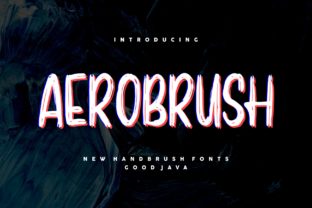
Aerobrush isn’t just another display font—it’s a confident, expressive tool designed to command attention without sacrificing clarity. With its energetic strokes, subtle brush-like texture, and contemporary rhythm, Aerobrush bridges the gap between hand-crafted authenticity and digital precision. It’s not meant for body text or long paragraphs. Instead, it thrives where personality matters most: headlines, logos, posters, social banners, packaging, and short-form visual storytelling.
What Makes Aerobrush Stand Out
At first glance, Aerobrush feels spontaneous—like a skilled hand moving quickly across paper. But look closer: each glyph balances intentional contrast, consistent weight distribution, and refined spacing. The slight tapering of strokes, the organic curve on terminals, and the confident x-height all contribute to strong legibility—even at smaller display sizes. Unlike many brush fonts that sacrifice structure for flair, Aerobrush maintains typographic discipline while feeling fresh and human.
It’s also highly versatile within its category. You can use it straight out of the box for a lively, modern vibe—or pair it thoughtfully with clean sans-serifs (like Inter, Poppins, or Manrope) to create compelling visual hierarchy. Its uppercase-heavy character set works especially well for branding moments where impact and memorability are non-negotiable.
Creative Applications Across Roles
Designers and Brand Strategists: Use Aerobrush to define brand voice in early-stage identity work—especially for lifestyle, wellness, creative agencies, or education startups. Try it on a workshop title slide, a podcast cover, or a limited-edition product label. Because it carries energy but not chaos, it communicates approachability and confidence simultaneously.
Marketers and Small Business Owners: In crowded digital feeds, Aerobrush helps your message break through. Apply it to Instagram story headers (“New Collection Live!”), email subject lines (as a stylized image), or event banners (“Join Our Summer Workshop”). Just avoid overusing it—reserve it for moments that truly benefit from emotional emphasis.
Educators and Content Creators: When designing learning materials or presentation decks, Aerobrush adds warmth and engagement to section titles or key takeaways. For example, a slide titled “Your First 30 Days: Build Momentum” gains immediacy when set in Aerobrush, while supporting body text stays readable in a neutral typeface. It subtly signals “this idea matters”—without needing extra animation or graphics.
Bloggers and Freelancers: If you’re building a personal brand around creativity, teaching, or making, Aerobrush reinforces your identity visually. Use it consistently—but sparingly—in your site’s hero headline, newsletter banner, or portfolio project thumbnails. Consistency builds recognition; restraint preserves impact.
Practical Tips for Strong Results
Pair with purpose. Aerobrush shines brightest when contrasted with simplicity. Choose a sans-serif with open counters and even color (e.g., Open Sans, Lato, or Montserrat) for supporting text. Avoid pairing it with other decorative or script fonts—clash distracts more than delights.
Test at real-world sizes. While Aerobrush looks vibrant at 48pt+ on screen, test how it renders at 24–36pt in mobile banners or printed business cards. Some brush textures soften or sharpen depending on output method—preview on actual devices before finalizing.
Keep color simple. Solid black or deep navy delivers maximum clarity. If using color, stick to one bold hue (like burnt orange or forest green) and avoid gradients or transparency overlays that muddy stroke definition. White-on-dark backgrounds often yield crisp, high-contrast results.
Respect context. Aerobrush may feel too informal for legal disclaimers, academic citations, or financial reports. That’s okay. Its strength lies in invitation—not instruction. Use it where you want people to pause, connect, and remember—not where they need to scan quickly or verify details.
Ideas to Spark Your Next Project
- Create a series of printable quote cards for your studio wall or client welcome kit—set each quote in Aerobrush, then add minimal line art or geometric accents.
- Design a workshop sign-up page where the headline (“Let’s Make Something Real”) uses Aerobrush, and bullet points beneath use a friendly, highly legible sans-serif.
- Develop a seasonal social media campaign: use Aerobrush for weekly theme headers (“Spring Sketch Challenge”, “Summer Color Lab”) paired with consistent photography style and palette.
- Refresh your email signature with a subtle, single-line tagline in Aerobrush—like “Making Ideas Visible”—to reinforce your professional focus without overwhelming the layout.
- Build a micro-brand for a side project: a zine name, podcast intro card, or craft fair banner. Aerobrush gives instant visual cohesion—even before you settle on full branding assets.
Why Restraint Strengthens Impact
Great typography doesn’t shout—it selects. Aerobrush earns its place by standing apart, not by appearing everywhere. When used once per layout—on the most important word or phrase—it becomes a focal point that guides attention naturally. Overuse flattens its energy and blurs its distinction. Think of it like a strong accent color in interior design: powerful in doses, exhausting in excess.
This principle applies whether you're designing a flyer for a local farmers’ market or launching a new online course. Ask yourself: What’s the one thing I want people to notice first? If the answer is a name, a date, a value, or a call to action—that’s where Aerobrush belongs.
Getting Started Thoughtfully
Before downloading or licensing Aerobrush, clarify your goal. Are you solving a visibility problem? Reinforcing a tone? Differentiating a product in a saturated space? Let that intention guide usage—not trend or novelty. Then, test early: mock up two versions of a headline—one in Aerobrush, one in your current go-to font. Which better supports your message? Which feels more aligned with who you serve?
Finally, remember that tools like Aerobrush don’t replace strategy—they amplify it. A bold font won’t fix unclear messaging or inconsistent visuals. But when matched with thoughtful content, audience awareness, and deliberate design choices, it becomes part of what makes your work both seen and remembered.
If you’ve been searching for a way to inject grounded energy into your visual communication—without leaning on trends that fade fast—Aerobrush offers a refreshingly direct path. It doesn’t ask you to overthink. It asks you to choose clearly, commit confidently, and let the type do the rest.