Sour Crunch: A Crunchy, Weird Display Font for Bold Visual Impact
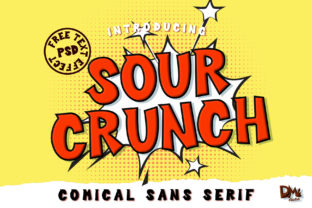
Sour Crunch isn’t built for body text, long-form reading, or subtle refinement. It’s a display font with personality—crunchy, expressive, and unmistakably comic-inspired. Its sharp angles, uneven baselines, and exaggerated letterforms echo the energy of vintage comic book lettering, but with modern spacing, OpenType features, and robust web font support. For professionals who need to grab attention without sacrificing craft, Sour Crunch fits cleanly into visual workflows where hierarchy, tone, and memorability matter most.
Where Sour Crunch Fits in Your Design Process
Think of Sour Crunch as a strategic accent—not a foundation. It works best when placed intentionally within a broader typographic system. Before opening your design tool, ask: What role does this headline or label need to play? If the answer involves signaling energy, irreverence, youthfulness, or playful contrast, Sour Crunch becomes a functional choice—not just an aesthetic one. It’s rarely the first font you select, but often the right second or third: a deliberate punctuation mark in a visual sentence.
For marketers building landing pages, Sour Crunch strengthens hero sections where conversion hinges on emotional resonance. For educators designing workshop slides, it adds memorable emphasis to key concepts without diluting clarity. Bloggers use it sparingly in featured post titles to create visual rhythm across feeds. Small business owners applying it to limited-edition product labels find it reinforces brand voice—especially when paired with clean sans-serifs like Inter or Roboto for supporting text.
Integration Before, During, and After Creation
Before implementation: Audit your current typography stack. Sour Crunch thrives alongside fonts with strong contrast in weight, proportion, and tone. Avoid pairing it with other highly decorative or similarly high-contrast display fonts—clash, not harmony, results. Instead, test combinations where Sour Crunch handles short, impactful text (e.g., “New Launch”, “Limited Stock”, “Level Up”) and a neutral, highly legible typeface handles everything else. Confirm licensing covers your intended use—web, app, print, or merchandise—before committing to mockups.
During execution: Use Sour Crunch only where its strengths align with user intent. In Figma or Adobe XD, apply it at sizes 36px and up for web, or 48pt+ for print—smaller sizes sacrifice legibility and amplify visual noise. Leverage its OpenType features: enable stylistic alternates for extra quirk, or use tabular numerals if integrating pricing or dates. In CSS, declare fallbacks explicitly: font-family: "Sour Crunch", system-ui, -apple-system, sans-serif;. Never rely on it for accessibility-critical UI elements like form labels or navigation links.
After deployment: Monitor real-world performance. Does it render consistently across Chrome, Safari, and Edge? Does it load quickly on mobile connections? If using self-hosted WOFF2 files, verify compression and preload critical instances. Track engagement metrics on pages where Sour Crunch appears prominently—do bounce rates shift? Do click-throughs on call-to-action buttons increase? These aren’t vanity metrics; they’re signals about whether the font supports—or undermines—your goals.
Workflow Examples Across Roles
Freelance designers: When pitching branding concepts, include Sour Crunch in one variant of your mood board—not as default, but as an option labeled “Bold & Expressive.” This invites client dialogue around tone rather than dictating preference. Later, embed it in style guide documentation with usage rules: “Max 1 headline per page,” “Never used for paragraph text,” “Always paired with Inter Light for captions.” Clarity here prevents inconsistent application down the line.
Educators and course creators: Use Sour Crunch in slide headers for breakout activities (“Try This Now”, “Your Turn”), then switch to a highly legible font for instructions. The contrast helps learners mentally segment content—what’s directive vs. explanatory. When exporting PDF handouts, embed the font properly and confirm glyph integrity, especially for accented characters if teaching multilingual audiences.
Small business owners: If printing product packaging or event posters, test Sour Crunch at actual scale before finalizing. Its texture reads differently on matte paper versus glossy vinyl. Order physical proofs. Also, consider how it scales on social thumbnails—does the “C” in “Crunch” remain legible at 120×120 pixels? Adjust tracking or choose alternate glyphs if needed. Consistency across touchpoints matters more than novelty.
Practical Tips for Reliable Use
- Limit scope: Restrict Sour Crunch to no more than two distinct uses per project—e.g., main headline + section divider. Overuse erodes impact and strains readability.
- Check color contrast: Its irregular shapes can reduce perceived contrast. Verify text meets WCAG AA standards against background colors using tools like WebAIM’s Contrast Checker—not just by eye.
- Organize assets: Store Sour Crunch files in a clearly named, version-controlled folder (e.g., /fonts/sour-crunch-v2.1/). Include license documents and usage notes. This saves time during audits or team handoffs.
- Test with real users: Show two versions of a promo banner—one with Sour Crunch, one with a standard display font—and ask which feels more aligned with your message. Qualitative feedback often reveals mismatches no spec sheet predicts.
- Plan for longevity: If building a brand identity, document why Sour Crunch was chosen—not just “it looks cool,” but how it reflects audience expectations, category conventions, or strategic differentiation. That rationale supports future decisions when updating assets.
Compatibility, Efficiency, and Long-Term Fit
Sour Crunch is well-supported in modern browsers and design tools, but efficiency depends on implementation discipline. Self-hosting keeps control over loading behavior; CDNs offer speed but less flexibility. For static sites, inline critical font declarations avoid flash-of-unstyled-text (FOUT). In dynamic apps, lazy-load non-essential instances—like animated banners that appear after scroll—rather than loading the full set upfront.
Usability isn’t just about rendering—it’s about intentionality. A font that slows down your site or confuses readers contradicts Sour Crunch’s purpose. Likewise, consistency across platforms requires testing: does it render correctly in email clients? In iOS Notes? In printed invoices? Address these early—not as edge cases, but as part of quality control.
Long-term, Sour Crunch remains effective when treated as a deliberate tool—not a trend. Its comic roots give it staying power in contexts where authenticity and energy are valued over neutrality. But like any strong voice, it gains authority through restraint. Revisit its usage every six months: does it still serve your goals? Has audience perception shifted? Are newer alternatives offering similar character with better performance? These aren’t signs of obsolescence—they’re markers of thoughtful integration.
Ultimately, Sour Crunch earns its place when it answers a clear question in your workflow: What do I want people to feel, remember, or do next? When it does that—concisely, confidently, and without distraction—it’s not just a font. It’s part of your process.