Prado: The Bold Comic-Inspired Display Font That Delivers—If You Use It Right
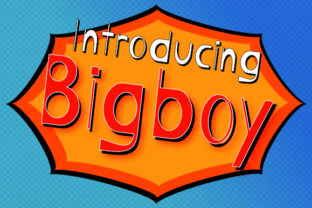
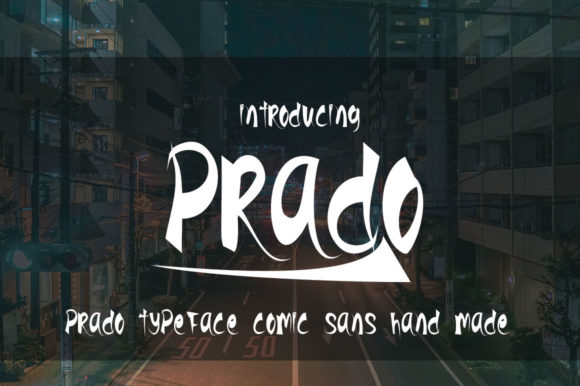
Prado isn’t just another display font—it’s a confident, expressive typeface born from comic book energy, with sharp angles, rhythmic contrast, and intentional imperfections that give it warmth and personality. Designed for impact, not subtlety, Prado thrives in headlines, posters, packaging, social graphics, and branding moments where you want to grab attention *and* hold it. But here’s what many overlook: its strength is also its limitation. Used without intention, Prado can overwhelm, confuse, or unintentionally undermine your message—even when it looks “cool” at first glance.
Why People Reach for Prado (and Why That’s Not Always Enough)
Designers and marketers often choose Prado because it promises instant character—no need for complex illustration or layered effects. A single word in Prado can feel like a scene from a vintage comic cover: dynamic, human, slightly playful but never childish. That makes it especially appealing for indie brands, event promotions, podcast titles, or educational materials aiming to feel approachable yet memorable.
But attraction alone doesn’t guarantee success. Too many users assume that because Prado is bold and distinctive, it’ll work anywhere boldness is needed. That’s like buying a race car because it’s fast—and then using it to haul groceries. The mismatch isn’t about quality—it’s about fit.
1. Using Prado for Body Text (or Anything Smaller Than 32px)
Prado was never built for reading paragraphs. Its tight spacing, exaggerated stroke endings, and irregular baseline alignment reduce legibility below ~28–32px—even on high-resolution screens. When used in blog intros, email headers, or mobile app banners under 24px, words start to blur together. Letters like “a”, “e”, and “s” lose definition; punctuation feels cramped; line height adjustments rarely fix the core issue.
Better approach: Reserve Prado strictly for short, high-impact phrases—titles, callouts, logos, or hero section headings. Pair it with a clean, highly readable sans-serif (like Inter, Poppins, or Open Sans) for supporting text. Test readability by stepping back three feet from your screen: if you hesitate before reading the second word, scale up—or switch fonts.
2. Ignoring Weight and Style Consistency Across Platforms
Prado comes in multiple weights (Regular, Bold, Black), but not all versions include italics or variable axes. Some free or third-party downloads only offer one weight—or worse, an unofficial “italicized” version created by skewing the Regular font. That breaks typographic hierarchy, weakens brand cohesion, and can trigger rendering inconsistencies across browsers or CMS platforms (especially WordPress or Squarespace).
You might think, “It’s just a slight slant—it’ll be fine.” But inconsistent italics affect accessibility (screen readers may misinterpret skewed glyphs), hurt print output (ink spread issues), and dilute visual rhythm in multi-line layouts.
Better approach: Download Prado only from its official source or trusted foundries like Font Squirrel or the designer’s verified portfolio. Confirm which weights and OpenType features (ligatures, stylistic sets) are included *before* licensing. If you need emphasis in body copy, use bold or color—not fake italics.
3. Overlooking Contextual Contrast and Color Contrast
Prado’s thick strokes and energetic forms demand breathing room. Placing it over busy photos, textured backgrounds, or low-contrast color combos (like charcoal gray on slate blue) erases its charm—and sometimes its legibility entirely. One freelance designer lost a client revision round because her Prado-based event poster vanished against a gradient background in printed samples. The font wasn’t wrong—the context was.
Also worth noting: Prado’s ink traps and sharp terminals don’t always render crisply at small sizes on older Android devices or embedded email clients. What looks vibrant in Figma may appear muddy in Outlook.
Better approach: Always test Prado in its final environment—not just your design tool. For web, preview on real iOS and Android devices using BrowserStack or native testing. For print, request a physical proof. And never skip WCAG contrast checks: aim for at least 4.5:1 between Prado’s darkest glyph and its background. When in doubt, add a subtle drop shadow or light stroke—but only if it serves clarity, not decoration.
What to Check Before You Commit
- Licensing scope: Does your plan cover web embedding, app usage, and merchandise? Free versions often exclude commercial redistribution—even for merch sold by small creators.
- Language support: Prado includes Latin, Greek, and Cyrillic characters, but check whether diacritics (like é, ñ, or ż) render cleanly in your target audience’s language.
- File format compatibility: Prefer WOFF2 for web; avoid TTF-only bundles if you’re integrating into Shopify or Webflow, which handle modern formats more reliably.
- Pairing potential: Try Prado with 2–3 neutral fonts in your workflow *before* finalizing a brand system. If nothing feels balanced, Prado may not be the right anchor—it’s okay to pivot.
When Prado Shines—And When to Step Back
Prado excels when the goal is emotional resonance, not neutrality. A music festival lineup? Perfect. A retro-themed café menu headline? Ideal. An Instagram story announcing a limited-edition product drop? Absolutely. But for a law firm’s website header, a university course syllabus title, or a healthcare app alert—its energy can feel incongruous or even untrustworthy.
That’s not a flaw in Prado. It’s a reminder that great typography serves communication first—and aesthetics second. The most effective designers don’t ask, “Does this look cool?” They ask, “Does this make the message clearer, faster, and more human?”
If you’ve already tried Prado and felt uncertain about the results, don’t scrap it—refine the context. Adjust spacing. Simplify the background. Shorten the phrase. Or try it in black-on-white first, before layering complexity. Small shifts often reveal Prado’s true versatility.
Ultimately, Prado rewards thoughtful use—not volume. It won’t fix weak messaging or poor layout. But in the right hands, with clear intent and tested execution, it turns ordinary designs into moments people remember. And that’s not just bold. It’s strategic.