Roar Bold: A Display Font That Balances Personality and Practicality
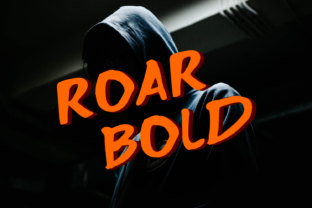
Roar Bold stands out not because it shouts, but because it speaks with clear intention. It’s a casual display font—designed for impact, not body text—that delivers visual strength without sacrificing approachability. Unlike many bold display typefaces that lean heavily into either retro exaggeration or sterile minimalism, Roar Bold occupies a thoughtful middle ground: expressive enough to anchor a brand identity, yet restrained enough to avoid overwhelming supporting content.
What Makes Roar Bold Distinctive—Beyond the Name
At first glance, Roar Bold appears deceptively simple: wide proportions, generous x-height, and slightly rounded terminals. But its distinction lies in subtle, deliberate choices. The letterforms avoid mechanical uniformity—the ‘a’, ‘g’, and ‘e’ carry gentle, humanist curves; the uppercase ‘M’ and ‘W’ have softened apexes rather than sharp peaks; and spacing is tuned for rhythm, not just symmetry. These details prevent the font from feeling generic or algorithmically generated—a common pitfall among newer display fonts.
Its weight is genuinely bold—not ultra-black or compressed—but substantial enough to command attention at sizes above 36pt. More importantly, Roar Bold maintains legibility even when scaled down to ~24pt in hero banners or app headers, where many display fonts blur or lose character. That functional range—strong presence at large sizes, surprising clarity at mid-scales—is rare and practical.
Where Roar Bold Performs Best (and Where It Doesn’t)
Roar Bold excels in contexts where tone matters as much as visibility: brand logos for lifestyle startups, podcast cover art, editorial mastheads, product packaging for artisanal goods, and social media graphics aimed at adult audiences who value authenticity over trend-chasing. For example, a small-batch coffee roaster might use Roar Bold for its logo and seasonal campaign banners—its warmth reinforces craft and care, while its boldness ensures recognition on Instagram feeds or tote bags.
It’s less suited for interface elements requiring fine typographic control (like navigation menus or data tables), long-form editorial headlines with complex hierarchies, or multilingual projects requiring extensive language support. Roar Bold currently offers Latin-based glyphs only, with no built-in Cyrillic, Greek, or extended diacritic coverage. Users working with Spanish, French, or Portuguese should verify accent rendering in their target environments—some accented characters appear slightly narrower than base letters, which may affect line rhythm in tight layouts.
Integration and Workflow Realities
Roar Bold is available in standard OTF and WOFF2 formats, making it straightforward to self-host on websites or embed in design tools like Figma, Adobe Creative Cloud, and Sketch. Its file size is modest (~80 KB for the regular weight), so web performance impact is negligible—even with multiple weights, loading remains efficient. No third-party font service is required, which simplifies licensing and reduces dependency on external CDNs.
In practice, pairing Roar Bold works best with neutral, highly legible sans-serifs: Inter, Public Sans, or even system fonts like SF Pro or Segoe UI. Avoid pairing it with other high-contrast or decorative fonts—its personality needs breathing room. One consistent observation across real projects: Roar Bold gains authority when used sparingly. A single-line headline, a short CTA button label, or a logo lockup benefits most. Overuse—such as applying it to every heading level or subheading—dilutes its impact and risks visual fatigue.
Audience Fit: Who Gains the Most Value?
Entrepreneurs launching direct-to-consumer brands often gravitate toward Roar Bold because it conveys confidence without sounding corporate. Educators designing workshop materials or conference slides appreciate how it adds energy to titles without alienating adult learners. Freelance designers report using it for client presentations where they need to signal creative competence quickly—its balance of friendliness and authority helps establish credibility early in a pitch.
Bloggers and independent publishers find it effective for newsletter banners or featured post headers, especially in niches like wellness, personal development, or sustainable living—audiences responsive to sincerity over polish. Small business owners managing their own marketing assets benefit from its ease of use: no steep learning curve, no need for advanced kerning adjustments in most cases, and reliable rendering across devices.
Quality and Long-Term Considerations
The font’s construction reflects professional attention to hinting and OpenType features. Standard ligatures are included (e.g., ‘fi’, ‘fl’), and basic stylistic alternates offer slight variations for the lowercase ‘a’ and ‘g’—enough to refine tone without complicating workflow. Kerning pairs are comprehensive for Latin-script combinations, and testing across browsers (Chrome, Safari, Firefox) and OS versions shows consistent rendering—no unexpected clipping, overlapping, or fallback behavior under normal conditions.
That said, Roar Bold isn’t designed for longevity in static branding systems requiring decades of reuse. Its casual sensibility ties it loosely to current design tendencies—think late-2020s editorial and digital branding—so organizations planning 10+ year visual identities may want to assess whether its warmth aligns with long-term positioning. It’s more of a strategic accent than a foundational typeface.
Practical Recommendations for Getting Started
- Start small: Apply Roar Bold to one high-visibility element—your site’s main headline or your logo—and observe how it shapes first impressions before expanding usage.
- Test contrast deliberately: Pair it with a neutral gray (not pure black) for body copy to preserve its warmth. Avoid high-contrast combos like Roar Bold + white-on-black unless intentional emphasis is needed.
- Check spacing in context: Its generous letter-spacing default works well on screens but may need tightening in print or tight digital containers. Adjust tracking by -25 to -50 units in design tools if lines feel too airy.
- Verify language coverage early: If your audience includes speakers of accented-language variants, test full names and common phrases—not just the alphabet—before finalizing layouts.
- Consider weight hierarchy: Roar Bold performs best as a standalone weight. While some versions include a lighter companion, relying solely on Roar Bold for all display needs can flatten typographic contrast. Reserve it for primary emphasis only.
Roar Bold doesn’t solve every typographic challenge—but it solves a specific, common one well: how to project strength and individuality without seeming forced or dated. It’s the kind of font that earns trust gradually: first through clarity, then through consistency, and finally through the quiet confidence of knowing exactly what role it plays. For professionals balancing creative expression with real-world constraints, that reliability—paired with genuine visual distinction—is where Roar Bold delivers measurable value.