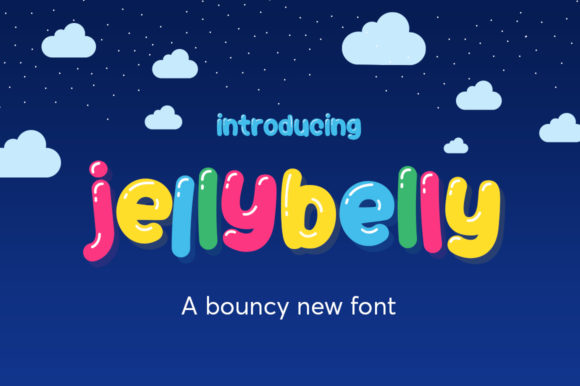
Jellybelly: A Playful, Purposeful Font for Human-Centered Design
Jellybelly isn’t just another display font—it’s a deliberate design choice that signals warmth, approachability, and intentional imperfection. Created by Salt & Pepper Designs, Jellybelly is jiggly, wiggly, and fabulously rounded—not in spite of its quirks, but because of them. Its soft curves, gentle inconsistencies, and hand-crafted rhythm make it ideal for projects where authenticity matters more than rigid uniformity. For professionals who balance creativity with clarity—whether crafting a brand voice, designing learning materials, or building a small business identity—Jellybelly fits naturally into real-world workflows where tone, trust, and readability intersect.
Where Jellybelly Fits in Your Creative Process
Fonts aren’t selected in isolation—they’re chosen at specific inflection points in a project’s lifecycle. Jellybelly shines most when you’re moving from strategy to expression: after defining your audience and core message, but before locking in visual hierarchy or final layouts. It’s rarely the first font you test—but often the one that clicks during refinement.
For marketers launching a new product line aimed at Gen Z or millennial parents, Jellybelly works early in mood board development. Its rounded forms and subtle bounce suggest playfulness without sacrificing legibility—making it useful for social banners, email headers, or packaging mockups where emotional resonance supports conversion goals. Educators building digital lesson kits might introduce Jellybelly during asset creation—not for body text, but for section dividers, interactive quiz buttons, or illustrated vocabulary cards where visual friendliness lowers cognitive load.
Entrepreneurs building a service-based website often reach for Jellybelly late in the UI design phase—after wireframes are approved and typography systems are being stress-tested. It pairs effectively with neutral sans-serifs (like Inter or Manrope) for contrast: Jellybelly handles personality; the companion font handles precision. That duality supports both brand storytelling and functional clarity.
Integration Without Friction
Compatibility starts with format—and Jellybelly ships in standard WOFF2, OTF, and TTF files, making it usable across Figma, Adobe Creative Cloud, Google Fonts (via self-hosting), and modern CMS platforms like Webflow or WordPress. No plugin dependencies. No licensing surprises for commercial use. That simplicity means less time troubleshooting and more time iterating.
It integrates cleanly with existing design systems when treated as a *role-specific* typeface—not a universal replacement. Use it for:
- Primary headlines (H1–H2) where tone-setting matters most
- Call-to-action buttons that benefit from tactile, inviting weight
- Illustrated infographics, especially those combining custom icons and short labels
- Printed workshop materials, where rounded letterforms soften formal content
Avoid overextending it. Jellybelly isn’t built for dense paragraphs, legal disclaimers, or data tables. Its charm lives in brevity and intention—not volume. When paired with a highly legible secondary font for body copy, the contrast reinforces hierarchy and improves scanability. That pairing isn’t decorative—it’s functional scaffolding.
Practical Implementation Tips
Start small. Before applying Jellybelly across an entire brand system, test it in one high-impact, low-risk context: a single landing page headline, a set of Instagram story templates, or the title slide of a client presentation. Observe how it performs under real conditions—not just in isolation on a type specimen sheet.
Pay attention to spacing. Jellybelly’s rounded terminals and generous counters respond well to slightly increased letter-spacing (50–100 units in design tools) at larger sizes. At smaller sizes (under 24px), tighten tracking minimally—but never force it into tight containers. Let its natural rhythm breathe.
Use color deliberately. Its softness gains strength against muted or earthy palettes—think warm greys, sage greens, or terracotta—rather than stark black-on-white. In accessibility testing, ensure sufficient contrast between Jellybelly text and background (minimum 4.5:1 for normal text). Its curves can reduce perceived contrast, so verify with tools like Stark or axe DevTools—not just visual judgment.
Consider language support. Jellybelly includes Latin-1 and basic Latin Extended-A characters, covering English, Spanish, French, German, and Portuguese. If your audience includes Turkish, Romanian, or Vietnamese speakers, verify glyph coverage for diacritics before scaling usage. When in doubt, export a test PDF with sample phrases and review with native speakers.
Workflow Examples Across Roles
Freelance designers use Jellybelly during discovery sprints—not as a default, but as a calibrated option when a client’s brand values emphasize empathy over authority. They’ll present three typographic directions: one minimalist (neutral sans), one editorial (serif), and one human-centered (Jellybelly + supporting sans). This frames the choice as strategic—not stylistic.
Educators developing online courses apply Jellybelly selectively: for module titles in LMS dashboards, not course descriptions. Its presence signals “this part is meant to engage, not assess.” Students subconsciously register that shift in tone, which supports motivation without requiring explicit instruction.
Small business owners launching a subscription box embed Jellybelly in their unboxing experience—on thank-you cards, ingredient labels, or QR code stickers—where physical touchpoints reward attention. Because it’s optimized for screen and print, they avoid reworking assets across formats. One file, multiple outputs.
Sustaining Quality Over Time
Long-term use depends less on the font itself and more on how consistently it’s applied. Create a simple internal guide—even a two-column Notion table—that defines:
- Where Jellybelly is required (e.g., all primary CTA buttons)
- Where it’s permitted (e.g., blog post titles, newsletter headers)
- Where it’s excluded (e.g., pricing tables, contact forms, footers)
This prevents drift. Without boundaries, playful fonts often creep into contexts where clarity trumps charm—eroding trust instead of building it.
Update thoughtfully. Salt & Pepper Designs occasionally releases minor updates—usually refining hinting or expanding character sets. Subscribe to their newsletter or check GitHub (if publicly hosted) for patch notes. Most updates are backward-compatible, but always test rendering in your top three browsers and on iOS/Android before deploying.
Finally, audit usage quarterly. Pull analytics on pages where Jellybelly appears most frequently. Are bounce rates lower? Do users spend more time on Jellybelly-led sections? Correlate—not assume. If data shows no lift, revisit the pairing or placement—not the font itself. Tools like Hotjar scroll maps or Microsoft Clarity can reveal whether Jellybelly draws attention where intended.
Why “Perfectly Imperfect” Is a Workflow Advantage
In a landscape saturated with ultra-polished, algorithmically optimized assets, Jellybelly’s slight irregularities serve a practical purpose: they signal human involvement. That perception matters in contexts where users question automation—like customer support chatbots, AI-generated reports, or templated sales emails. A Jellybelly headline above a clearly written, empathetic paragraph tells users, “A person shaped this—not just a process.”
That doesn’t mean abandoning structure. It means choosing tools that support your goals—not just your aesthetics. Jellybelly works because it’s designed with constraints in mind: limited weights (regular and bold), intentional spacing, and a focus on immediate recognition over novelty. It’s not trying to be everything. It’s trying to do one thing—add warmth with precision—and it does that reliably.
So whether you’re sketching a pitch deck, prototyping a mobile app, or redesigning a community newsletter, treat Jellybelly as a collaborative tool—not just a visual element. Apply it where human connection accelerates understanding. Pair it where contrast strengthens meaning. And step back when its role is complete. That’s how a jiggly, wiggly font becomes a quietly powerful part of your workflow.