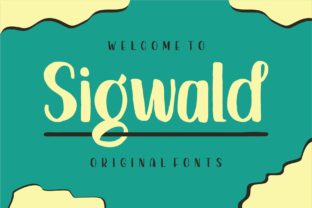
Sigwald: A Bold, Swash-Fueled Font That Fits Real Creative Workflows
Sigwald isn’t just another display font—it’s a deliberate creative catalyst. Designed with audacity and playfulness in mind, it stands out for its extensive, expressive swashes and strong personality. But what makes Sigwald truly useful—not just eye-catching—is how naturally it integrates into actual design workflows. Whether you’re drafting a social media campaign, designing course materials, branding a small business, or laying out a zine, Sigwald serves a functional role: it helps ideas land with clarity, confidence, and character.
Where Sigwald Fits in the Creative Process
Fonts aren’t used in isolation—they’re part of a sequence. With Sigwald, timing matters. It rarely works as body text, but shines early in ideation (as a mood-setter in mockups), mid-process (as a focal point in layouts), or late-stage (as a polished accent in final assets). For example, a marketer might sketch a newsletter header in Sigwald before settling on a palette—its swashes instantly communicate energy and approachability, helping align stakeholders before any code is written or copy finalized.
Educators building slide decks often test fonts during lesson planning. Sigwald’s bold letterforms increase visual retention for key terms—like “hypothesis” or “iteration”—without requiring animation or extra graphics. Its swashes add subtle rhythm, guiding attention without distracting from content. That’s not decoration; it’s cognitive scaffolding.
Before the Project: Preparation and Compatibility
Before adding Sigwald to a project, check two things: licensing and technical fit. Sigwald is available in OpenType format with full swash support, meaning it works reliably in Adobe Creative Cloud apps (Illustrator, InDesign, Photoshop), Affinity Suite, and modern web environments via @font-face. But not all platforms render swashes automatically—you’ll need to enable them manually in design software (via the Glyphs panel or OpenType features) or through CSS font-feature-settings.
Preparation also means understanding your audience. Sigwald’s exuberance suits brands that value authenticity over polish—think indie publishers, craft studios, wellness coaches, or edtech startups targeting Gen Z and younger millennials. It’s less suited for corporate legal documents or enterprise dashboards where neutrality and legibility at small sizes are non-negotiable. Knowing that upfront saves revision time later.
During Execution: Workflow Integration Tips
Here’s how Sigwald moves smoothly through active work:
- Pair intentionally: Use Sigwald for headlines, logos, or pull quotes—and pair it with a neutral sans-serif (like Inter, Lato, or Montserrat) for body copy. This contrast creates hierarchy without competition.
- Leverage swashes selectively: Not every letter needs a flourish. Start by applying swashes only to initial caps or terminal letters in short phrases (“Workshop”, “Launch”, “You”). Overuse dilutes impact and slows readability.
- Test at real sizes: Sigwald’s details hold up best above 24pt in print and 32px on screen. Below that, simplify—swap to the standard weight without swashes, or use it only in SVG vector form for crisp scaling.
- Batch-enable features: In InDesign, save swash-heavy character styles as reusable presets. In Figma, create text variants with OpenType features baked in—so team members apply consistent styling without digging into settings.
A freelance designer recently used Sigwald to rebrand a local pottery studio. Instead of starting with color or layout, they built a 5-word typographic mood board: “Clay • Fire • Handmade • Earth • Joy”. Each word used a different Sigwald swash variant. That single exercise clarified tone, guided color choices, and even influenced the photographer’s shot list—proving how early, focused typography work can streamline downstream decisions.
After Delivery: Consistency and Long-Term Use
Once Sigwald is live—in a website, presentation deck, or printed catalog—consistency becomes operational, not aesthetic. Document usage rules in a brand guideline snippet: which weights to use, when swashes are permitted, minimum size thresholds, and fallback fonts for web. This prevents drift across team members or contractors.
For long-term projects—like an educator’s multi-year curriculum or a blogger’s evolving visual identity—Sigwald scales well because its personality is stable. Unlike trend-driven fonts that feel dated in 18 months, Sigwald’s originality comes from structure, not fads. Its uppercase ‘S’ and ‘G’, for instance, have distinctive terminals that read as confident rather than gimmicky—making them durable across seasons and formats.
Real-World Cross-Platform Considerations
Using Sigwald across tools requires small but meaningful adaptations:
- Web: Host the font locally (not via third-party CDNs) for faster loading and full OpenType control. Use
font-feature-settings: "swsh" 1, "calt" 1in CSS to activate swashes and contextual alternates. Always declare a system fallback stack (font-family: "Sigwald", -apple-system, BlinkMacSystemFont, "Segoe UI", sans-serif;) for graceful degradation. - Presentation tools: In PowerPoint or Google Slides, embed Sigwald as a custom font—but verify rendering on attendee devices. Better yet, convert key titles to outlines (vector shapes) before sharing externally.
- Print & packaging: Export PDF/X-4 with fonts embedded and subsets disabled. Swashes rely on full glyph sets, so subsetting may omit alternate characters needed for proper display.
What Sigwald Doesn’t Do (and Why That Matters)
Sigwald doesn’t replace strategy. It won’t fix weak messaging, poor information architecture, or misaligned goals. What it does do is amplify intention—if your goal is warmth, approachability, and human-centered expression, Sigwald delivers it with precision. It’s not a shortcut; it’s a lever.
That distinction matters for professionals who manage multiple tools daily. You wouldn’t use a chisel to sand wood—and similarly, Sigwald isn’t meant for data tables or footnotes. Recognizing its scope keeps your workflow efficient. When you reach for Sigwald, you’re choosing emphasis, not default. That intentionality ripples outward: into clearer briefs, tighter feedback loops, and faster stakeholder alignment.
Getting Started Without Overcomplicating It
You don’t need a full brand system to benefit from Sigwald. Try this low-lift integration:
- Pick one recurring asset—your email signature, Canva social template, or Notion page header.
- Replace the current headline font with Sigwald Light or Regular (skip Bold for now—it’s strong enough without extra weight).
- Enable one swash—just the first letter of your name or business title.
- Use it consistently for two weeks. Notice how people respond. Track whether it improves recognition or engagement—even informally.
If it fits, expand. If not, pause and ask why—not “Is Sigwald good?” but “What part of my process needs more distinctiveness right now?” That question, answered honestly, leads to better tool choices far beyond typography.
Sigwald works best when treated as a collaborator—not a decoration. It responds to thoughtful structure, rewards clear intent, and gains strength through repetition. Whether you’re launching a product, teaching a concept, or simply making your weekly planner feel more like *you*, Sigwald gives voice to what matters most: clarity, humanity, and the quiet confidence of work that feels authentically done.