Bunny Hopper: A Playful, Fresh Font That Fits Real Creative Workflows
Bunny Hopper isn’t just another display font—it’s a deliberate design choice that supports clarity, personality, and emotional resonance in everyday creative work. Designed with lightness and charm, it brings a sense of joyful intentionality to projects where tone matters as much as typography. Whether you’re drafting a workshop handout, designing a product launch page, or building a brand identity for a small business, Bunny Hopper fits naturally into the rhythm of how people actually plan, create, and communicate.
What Bunny Hopper Is—and Where It Fits in Your Process
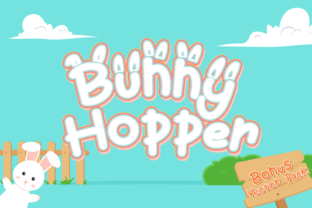
Bunny Hopper is a playful, fun, and fresh font family with two distinct styles: Regular and Bunny Ear. The Regular version offers clean legibility at medium sizes—ideal for headings, short paragraphs, or interface labels that need warmth without sacrificing readability. The Bunny Ear variant adds subtle, stylized ear-like flourishes to certain characters (like A, R, and Y), making it perfect for moments where visual delight reinforces meaning—think event invitations, children’s learning materials, or branding for wellness, education, or lifestyle ventures.
Unlike fonts built solely for impact or novelty, Bunny Hopper was designed for integration. It doesn’t demand attention; it invites engagement. That makes it especially useful during the middle stages of a project—after research and strategy are set, but before final assets lock in. It helps bridge conceptual intent with tangible execution, giving structure to ideas that need both precision and personality.
Using Bunny Hopper Before, During, and After Key Workflow Moments
Before a project starts: Use Bunny Hopper in mood boards, client briefs, or internal kickoff decks—not as final copy, but as a tonal anchor. Its presence signals an approach rooted in accessibility, friendliness, and human-centered thinking. When stakeholders see it early, they subconsciously align expectations around voice and visual rhythm.
During active creation: Apply it selectively where contrast and character matter most. For example:
- In educational slide decks, pair Bunny Hopper Regular for section headers with a neutral sans-serif body font—this improves scannability while preserving approachability.
- In social media graphics for small businesses, use Bunny Ear for limited headline text (e.g., “Spring Sale!” or “New Recipe Inside!”) to add instant recognition without cluttering layout.
- In printed workshop materials, set activity titles in Bunny Hopper and instructions in a highly legible body font—this creates intuitive visual hierarchy and reduces cognitive load.
After delivery: Bunny Hopper continues working quietly in asset reuse and brand evolution. Because it scales well across formats—from PDF reports to Instagram Stories—it maintains consistency when repurposing content. That saves time during quarterly refreshes or campaign expansions, especially for solopreneurs and small teams managing multiple channels.
How Bunny Hopper Works With Other Tools and Systems
Bunny Hopper integrates cleanly with common design and publishing environments. It’s available in standard webfont formats (WOFF2, TTF) and works reliably in Figma, Adobe Creative Cloud, Canva, and Google Docs (via font upload or extension). No special plugins or licensing hurdles interfere with daily use—just install once, then apply where needed.
It pairs effectively with widely supported system fonts like Inter, Open Sans, or Lato for body copy—creating contrast without dissonance. That compatibility means less time testing fallbacks and more time refining message and layout. For developers embedding it in websites, Bunny Hopper loads quickly and renders consistently across devices, supporting responsive workflows without extra optimization steps.
For educators and trainers, Bunny Hopper also complements digital whiteboard tools like Miro or FigJam. Drop it into sticky notes or header blocks to signal transitions between topics or energy shifts in virtual sessions—its light weight and friendly shape help maintain focus without visual fatigue.
Practical Tips for Consistent, Efficient Use
Start small. Don’t default to Bunny Hopper for every heading. Instead, define clear usage rules upfront—for example: “Bunny Hopper Regular only for H2s in blog posts” or “Bunny Ear reserved for callouts in customer-facing PDFs.” This prevents visual noise and builds muscle memory across your team or personal workflow.
Test contrast early. While Bunny Hopper is legible on light backgrounds, avoid using Bunny Ear on busy textures or low-contrast color combinations. A quick 5-second glance test—step back from your screen and ask, “Is the message instantly clear?”—goes further than technical specs alone.
Keep licensing simple. Bunny Hopper includes commercial use rights, so whether you’re designing for a nonprofit newsletter or packaging for an e-commerce launch, there’s no need to pause mid-process to verify permissions. That continuity supports faster iteration and fewer last-minute swaps.
Organize files thoughtfully. Save both weights in a dedicated “Typography” folder within your project assets, named clearly (e.g., BunnyHopper-Regular.woff2, BunnyHopper-BunnyEar.ttf). This avoids confusion when handing off to collaborators or revisiting older work months later.
Why Long-Term Use Makes Sense—Especially for Busy Professionals
Many designers cycle through trendy fonts, chasing novelty. Bunny Hopper stands out because it balances freshness with function—making it sustainable over time. Its dual-style structure means you can evolve its role without replacing it entirely. One year, you might use Bunny Ear sparingly for seasonal campaigns; the next, you expand it into email subject lines or app onboarding screens—all while keeping visual cohesion.
For freelancers juggling multiple clients, having a go-to font that reads as both professional and personable reduces decision fatigue. You spend less time debating type choices and more time solving real problems—like improving conversion flow or clarifying learning objectives.
Small business owners benefit too. Bunny Hopper communicates care and creativity without requiring design expertise. Upload it to your Canva brand kit, assign it to key templates, and maintain recognizable tone across flyers, menus, and online ads—even if you’re updating them solo between meetings.
A Note on Quality Control and Real-World Readability
Because Bunny Hopper prioritizes charm without compromising structure, it holds up well in print and digital contexts. Test prints at actual size—especially for letterpress or sticker applications—to confirm spacing and flourish visibility. On screen, preview at 100% zoom on mobile and desktop to ensure Bunny Ear elements remain legible at smaller sizes (it performs best at 24px and above for display use).
Consistency here isn’t about rigid repetition—it’s about predictable behavior. When Bunny Hopper appears, users know they’re in a space designed with intention and ease in mind. That kind of quiet reliability builds trust, especially in learning materials, service explanations, or community-facing communications.
Bringing It Into Your Next Project—Without Overcomplicating Things
You don’t need a full rebrand to start using Bunny Hopper. Try it this week in one low-stakes place: update the header font in your next newsletter draft, redesign a single workshop slide, or swap in Bunny Ear for the title on your next blog post graphic. Notice how it changes the feel—not just of the asset, but of the energy you bring to creating it.
That’s the real value: Bunny Hopper supports process, not just presentation. It fits where you already work—in planning documents, collaborative files, client deliverables, and personal projects—without demanding overhaul or extensive training. It’s ready when you are.