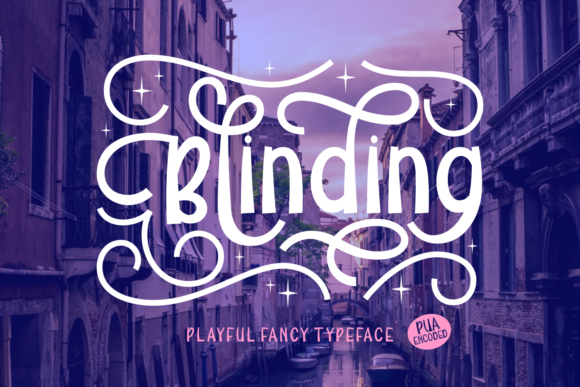
Blinding: When Typographic Boldness Becomes a Design Catalyst
Typography is rarely neutral. Even the most restrained typeface carries intention—whether it’s quiet authority, gentle warmth, or deliberate restraint. But every so often, a font arrives that refuses neutrality altogether. Blinding is one such presence: not merely a display typeface, but a typographic catalyst—a tool that reshapes how designers, educators, marketers, and even small-business owners approach visual communication. Its name isn’t hyperbole; it signals an immediate, visceral impact—one that demands attention without shouting, and commands space without crowding.
What Makes Blinding Distinctive—Beyond the Obvious Boldness
At first glance, Blinding appears defined by its weight: thick strokes, generous counters, and tightly tuned spacing that gives letters both density and air. Yet its uniqueness lies deeper—in the subtle tension between playfulness and precision. Unlike many bold display fonts that rely on exaggerated serifs or cartoonish exaggeration, Blinding achieves its “fancy” quality through intelligent contrast: vertical stems swell with confident modulation, while terminals taper with calligraphic nuance. The uppercase “A” features a sharp apex and a grounded crossbar; the lowercase “g” balances a closed loop with a graceful descender. These aren’t arbitrary flourishes—they’re considered decisions rooted in letterform history, reinterpreted for contemporary immediacy.
This duality—playful yet precise, fancy yet functional—is what makes Blinding unusually adaptable. It doesn’t just sit atop a design; it invites collaboration with other elements. Pair it with a clean, humanist sans-serif like Inter or Lato for body text, and the contrast feels intentional, not jarring. Set it against tactile textures—linen paper scans, brushed metal gradients, or hand-drawn borders—and it gains warmth instead of coldness. That adaptability stems from optical consistency: every glyph maintains proportional harmony across weights (where available) and sizes, ensuring legibility even at smaller display scales—say, 36px on a mobile hero banner.
Real-World Applications Across Diverse Contexts
The strength of Blinding isn’t theoretical—it reveals itself in practice, across fields where clarity, memorability, and emotional resonance intersect.
Educational Materials That Stick
In classrooms and digital learning platforms, cognitive load matters. Students process information more efficiently when visual hierarchy supports comprehension—not competes with it. Educators using Blinding for section headers in interactive worksheets or presentation slides report improved recall during review sessions. Why? Because the font’s strong silhouette creates distinct visual anchors. A biology teacher might use Blinding for “Cell Division Stages” before switching to a highly legible, open-source font like Open Sans for explanatory bullet points. The contrast doesn’t distract—it directs. Similarly, museum exhibit designers apply Blinding to thematic titles (“The Industrial Shift”, “Voices Unheard”) where brevity and emotional weight are essential. Visitors remember the phrase *and* its context—not because it’s loud, but because it’s unmistakably placed.
Small Business Identity With Instant Recognition
For local cafés, independent bookshops, or artisan studios, standing out on crowded social feeds or neighborhood signage is non-negotiable. A logo built around Blinding delivers recognition at a glance—even without color or iconography. Consider a ceramicist who uses Blinding for her studio name on packaging: the font’s rounded terminals echo the soft curves of her mugs, while its boldness conveys craftsmanship confidence. No need for extra embellishment. Likewise, a boutique fitness studio might set “Breathe • Move • Rise” in Blinding on its front window—each word gaining rhythmic emphasis through spacing and weight, reinforcing brand ethos without slogans or stock imagery.
Digital Interfaces Where Personality Meets Purpose
Web designers often default to ultra-thin or geometric fonts for “modernity,” overlooking how personality builds trust. Blinding challenges that assumption. Used judiciously—as a headline above a testimonial carousel, or as a hover effect on primary CTAs—it introduces warmth and humanity into interfaces that might otherwise feel transactional. One SaaS startup serving creative freelancers adopted Blinding for feature cards (“Pitch Perfect”, “Client Sync”, “Invoice Flow”). Users reported feeling the platform “understood their workflow”—not because of copy alone, but because the typography signaled intentionality and care. Crucially, this works only when Blinding is applied with restraint: never for paragraphs, rarely for navigation labels, always with ample line-height and thoughtful color contrast.
Practical Considerations Before You Implement
Like any powerful tool, Blinding rewards thoughtful application—and reveals limitations when misapplied. Awareness isn’t about restriction—it’s about maximizing impact.
- Legibility thresholds matter. While surprisingly readable at 28–32px on screen, avoid setting Blinding below 24px in body contexts—even for short captions. Its generous stroke width begins to blur at smaller sizes, especially on lower-DPI displays.
- Color contrast must be intentional. Its boldness amplifies contrast needs. Avoid light gray on white or pastel-on-pastel pairings. WCAG AA compliance is easily achieved with dark charcoal (#333) on off-white or deep navy (#1a2b4d) on cream—but test across devices.
- Licensing is contextual. Most versions of Blinding require commercial licenses for web embedding or app usage. Free trials often permit mockups and presentations, but production deployment—especially on client sites or e-commerce banners—requires verification. Always check the foundry’s terms; reputable sources clearly distinguish desktop, web, and app permissions.
- Pairing isn’t optional—it’s structural. Using Blinding alongside another bold display font dilutes its effect. Instead, seek contrast: a warm, low-contrast sans-serif (like Poppins or Nunito) or a sturdy, old-style serif (such as Crimson Text or PT Serif) provides balance. Avoid monospaced or ultra-condensed companions unless pursuing deliberate dissonance for artistic projects.
How Blinding Fits Into Evolving Design Priorities
Current design trends increasingly value authenticity over polish, clarity over cleverness, and inclusivity over exclusivity. Blinding aligns with these shifts—not as a trend-chaser, but as a response to deeper needs. Its “fancy” quality isn’t superficial ornamentation; it’s expressive functionality. In an era saturated with algorithmically generated visuals and templated layouts, a font like Blinding offers designers a way to reintroduce human judgment: where to emphasize, where to pause, where to invite curiosity.
Researchers studying visual attention have observed that moderately high-contrast, medium-to-large display typefaces trigger faster fixation and longer dwell time than ultra-thin or overly decorative alternatives. Blinding sits squarely in that optimal zone—bold enough to register instantly, refined enough to sustain interest. That’s why it appears in award-winning editorial layouts (as masthead treatments), accessibility-forward nonprofit campaigns (paired with dyslexia-friendly body fonts), and even academic conference branding—where gravitas and approachability must coexist.
From Inspiration to Execution: A Lightweight Workflow
You don’t need complex tools to begin working with Blinding. Start simple:
- Define the role. Ask: Is this for a headline? A logo lockup? A social media graphic? Clarity here prevents overuse.
- Test early, test often. Render your chosen phrase in Blinding at three sizes—desktop large, tablet medium, mobile small—on actual devices, not just previews.
- Anchor with rhythm. Use consistent spacing: if your heading is set at 48px, maintain at least 1.5× that (72px) as margin-bottom before body text begins. Let the font breathe.
- Validate contrast. Use free tools like WebAIM’s Contrast Checker—not just for compliance, but for perceptual comfort across age groups and lighting conditions.
- Document your rationale. Note why Blinding serves this specific purpose—not just “it looks cool.” That discipline strengthens future decisions and aids team alignment.
Ultimately, Blinding succeeds not because it dominates a layout, but because it clarifies intent. Whether you’re a researcher designing a conference poster, a hobbyist launching a zine, or a developer crafting a dashboard welcome message, its value lies in how it helps others understand—not just see—what matters most. Typography, at its best, is translation: converting ideas into perception. With Blinding, that translation happens faster, lands softer, and stays longer.